iPhone's Home Screen Quick Actions feature for the Alarm.com app
The Customer app takes advantage of Apple's Home Screen Quick Actions and gives you access to various Quick Actions right from the home screen.
Important: Home Screen Quick Actions are only available on iPhones with iOS version 13.0+.
Quick Actions available
- Arm Away
- Arm Stay
- Disarm
- Lock or Unlock Locks
- Open or Close Garage Doors
- View Cameras
- View Thermostats
- View Lights
- View Doorbells
How to configure Home Screen Quick Actions:
Note: Up to four items can be added to the Home Screen Quick Actions.
- Log into the Customer app.
- Tap
 .
. - Tap App Settings.
- Tap Home Screen Quick Actions.
- Tap Edit.
- A prompt to enter your password may appear if Keep me logged in was not selected at login. This is required for Home Screen Quick Actions features to work.
- In More Items, perform any of the following:
- Tap
 to add items to the Home Screen Quick Actions list.
 - Tap
 to remove items from the Home Screen Quick Actions list.
 - Drag on the right side of the Home Screen Quick Actions list to reorder items.
Note: To configure arming settings, tap on the desired arming setting.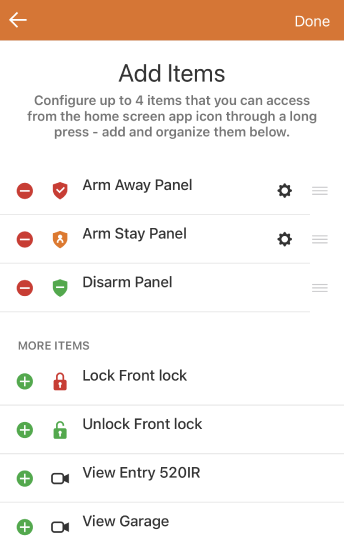
- Tap
- When finished, tap Done.
How to use Home Screen Quick Actions:
- From the home screen, press and hold the Customer app icon to reveal the Quick Actions.
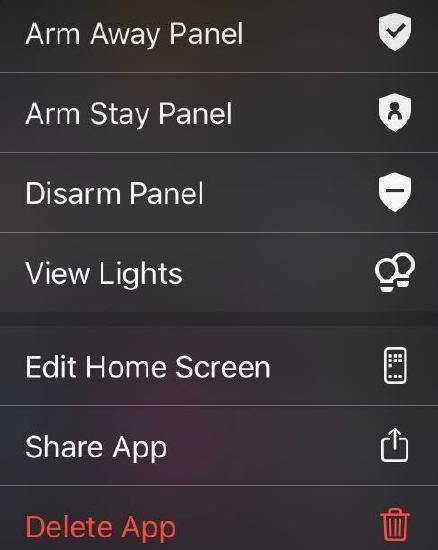
- Tap the desired Quick Action.
- There may be a prompt to enter an app PIN or provide a Touch ID, if applicable.
Important: The Thermostat, Light, Doorbells, and Camera Quick Actions will open the app to the corresponding view, where it is possible to view or control the desired item.