Add a new Geo-Device
A Geo-Device is a geographically aware mobile device that can be configured to automate home settings and initiate additional notifications based on the location of the Geo-Device relative to your home, office, or other location.
Enabling Geo-Services in the Alarm.com app will add the mobile device to the Alarm.com customer website as a Geo-Device.
To enable Location Services using the Alarm.com app:
Note: If multiple mobile devices are to be used for Alarm.com Places rules, use the following steps for each device.
- Log into the Alarm.com app.
- Tap
 .
. - Tap App Settings.
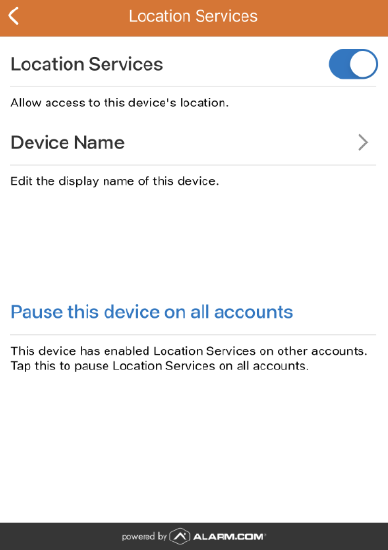
- Tap Location Services.
- Tap the Location Services toggle switch to the ON position. This enables Location Services on your device and adds the device to the website as a Geo-Device.
Important: If unable to toggle Location Services on, you may need to enable location settings for the app in your phone settings. For more information, see Alarm.com Places troubleshooting guide.
Note: The Geo-Device needs to calibrate after being enabled so it is recommended to allow the device to exit and re-enter the Geo-Fence after setup.
For more information about how to configure a Geo-Device, see Geo-Devices.
Frequently asked questions
Is there a limit to the number of Geo Devices that can be added to an account?
No. There is no known limit to the number of Geo-Devices that can be added to an account.