Access trouble condition help
Some trouble conditions can be resolved without the need to involve your service provider. By simply tapping a trouble condition wherever it appears, you can access more information about the issue. The information provided may include basic troubleshooting steps, launching additional troubleshooting wizards, and your service provider info for further assistance.
Trouble condition explanations and help are available wherever trouble condition alerts appear:
- The Alarm.com customer website
- The Alarm.com app
- Trouble condition emails
To access trouble condition help:
- Log into the Alarm.com app.
- In Issues, tap the trouble condition.
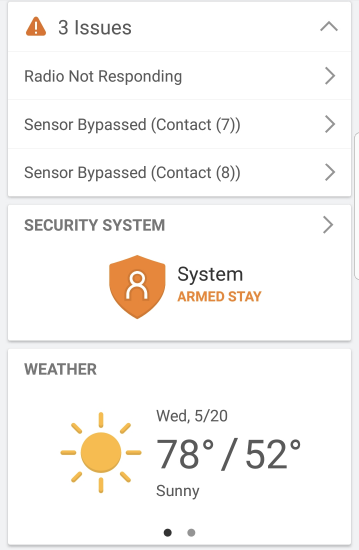
- On this page, more information about what the trouble condition means and what caused it is found.
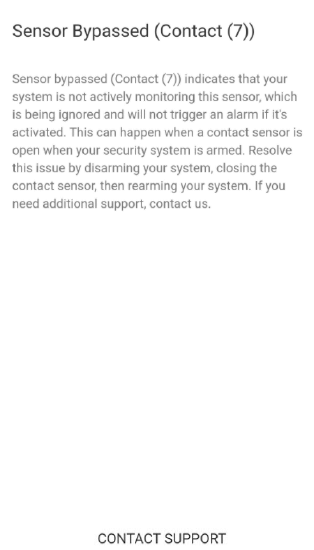
- For trouble conditions with simple solutions (e.g., Sensor Bypassed), the page includes information about how to resolve the issue.
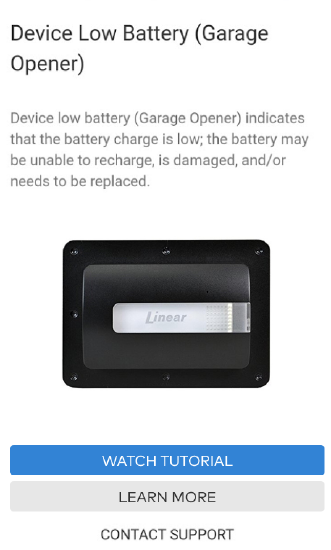
- For common trouble conditions (e.g., Device Low Battery), a Watch Tutorial button is available to view videos for more information.
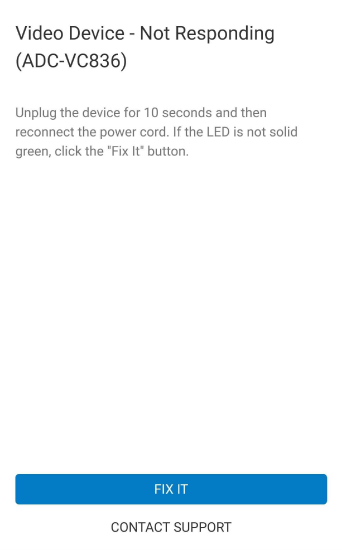
- Some trouble conditions (e.g., Video Device Not Responding) include a Fix It button that launches any related troubleshooting wizards.
- For trouble conditions with simple solutions (e.g., Sensor Bypassed), the page includes information about how to resolve the issue.
Trouble condition help also contains a link to Contact Support, so you can receive additional guidance from your service provider if needed.
Example trouble condition explanations and help text
Front Door Sensor Bypassed: Indicates that your system is not actively monitoring this sensor, which is being ignored and will not trigger an alarm if it's activated. This can happen when a contact sensor is open when your security system is armed. Resolve this issue by disarming your system, closing the contact sensor, then rearming your system. If you need additional support, contact us.
Image Sensor Tamper: Indicates that this image sensor was moved, opened, or shaken. Image sensors have an accelerometer that senses when it is in motion or tilted. Any time your image sensor is moved or something causes it to vibrate (like a door closing hard), you will see this issue. Make sure your image sensor is upright and leave it motionless for at least 5 minutes. If this does not resolve the issue, contact us for support.
Panel Low Battery: Indicates that the backup battery in your security panel is drained, which typically happens after an AC power failure. To resolve the issue, let the battery recharge. If the battery cannot recharge, it may need to be replaced by support.
Thermostat Too Warm: Indicates that the temperature reported by your thermostat is higher than the threshold that you have specified in the Temperature Notification rule. Check your thermostat and rule settings. If you need additional support, contact us.